

Session Replay for Debugging: Reproduce Any Bug From a Recording
A session replay records the DOM, console, and network of a real user session, so you stop guessing at 'steps to reproduce' and just press play. Here is how it works, and where it saves the most time.
Most bugs don't die because they're hard to fix. They die in a back-and-forth: 'Can't reproduce. What were the exact steps?' The reporter doesn't remember, their environment is different, and the ticket goes stale. The single most expensive minute in debugging is the one spent trying to make the bug happen a second time.
Session replay removes that loop. It records the DOM, console, and network of a real session and lets you replay it faithfully, so reproduction stops being detective work and becomes a button you press. This guide explains how that recording actually works, what to capture, and walks a real vague report all the way to a fix handed to an AI agent. It also covers the parts vendors gloss over: privacy, storage, and where replay genuinely falls short.
What a session replay actually records
It is not a video. Tools like rrweb (the open-source library behind most modern replay products) serialize the DOM into a full snapshot, then record everything that changes afterwards as incremental snapshots: clicks, inputs, scrolls, route changes and DOM mutations, all captured as a compact JSON event stream. On playback, the Replayer rebuilds the initial page and re-applies each event in timestamp order. Because it is the real reconstructed DOM, you can open dev tools inside the replay and inspect any element at any moment, something a screen recording can never give you.
- DOM mutations: every element change, in order, with timestamps.
- Console: logs, warnings, and the exact error with its stack trace.
- Network: requests, status codes, timing, and (optionally) payload shapes.
- User input: clicks, keypresses (masked), scroll position, and viewport size.
DOM recording vs. video: why replays are lightweight and searchable
The mechanism that makes this cheap is the browser's MutationObserver API. A recorder registers an observer with childList, attributes, characterData and subtree set to true, and the browser hands it a batched list of MutationRecord objects describing exactly what changed. Crucially, that callback runs as a microtask: if a script adds 100 nodes in a loop, the observer fires once with all 100 mutations batched together, not 100 times. That batching is why recording a busy single-page app adds negligible overhead. The observer can watch childList (nodes added or removed), attributes (an element's attributes changing), and characterData (text-node content changing), and with subtree enabled it applies all of those to every descendant of the root, precisely the coverage a faithful replay needs.
Contrast that with video. A screen recording encodes pixels at a fixed frame rate whether the page is idle or not, producing megabytes per minute of opaque frames you can only watch. A DOM replay stores only the deltas (a class toggled, a text node changed, a request fired) as structured JSON. That has three consequences: recordings are far smaller, they are searchable (you can jump straight to the mutation that added an error banner), and they are inspectable (real elements, real computed styles, real text). rrweb even provides a checkout mechanism (checkoutEveryNth / checkoutEveryNms) precisely because the incremental-snapshot chain has to be periodically re-anchored to a fresh full snapshot so playback can start from any point.
What to capture: DOM, console, network, and user events
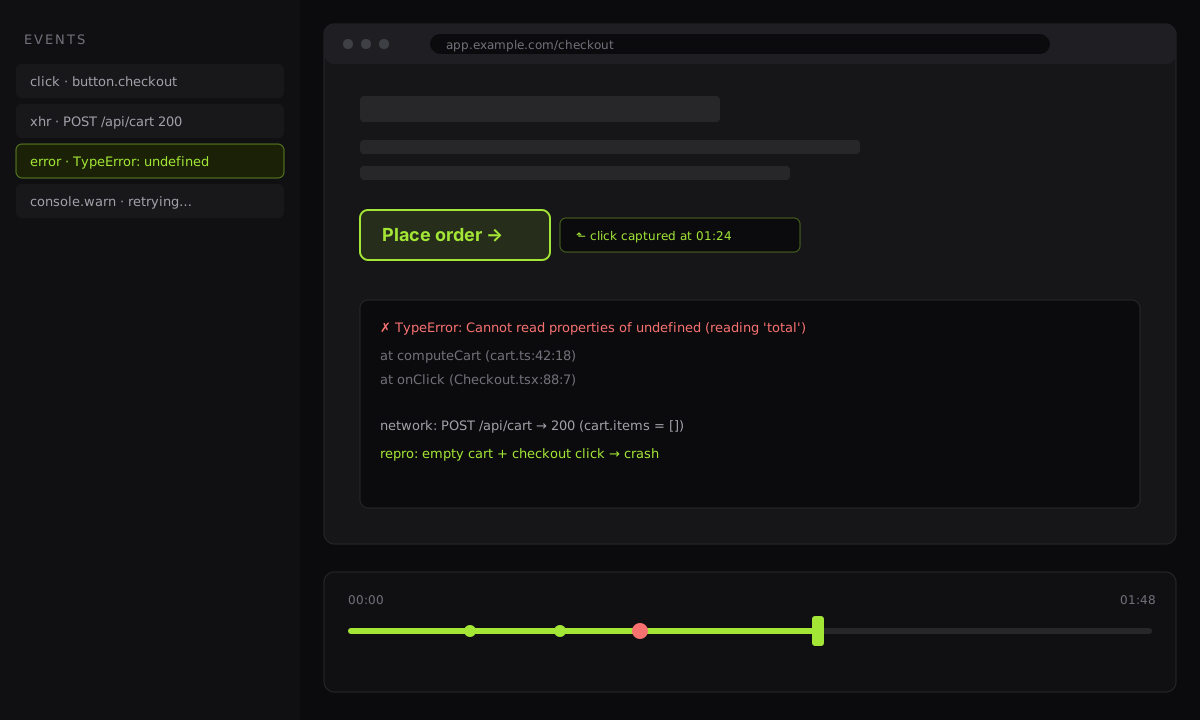
The DOM stream alone tells you what the user saw. To turn a replay into a debugging tool you layer three more streams onto the same timeline.
Console. Logs, warnings, and thrown errors with their stack traces. Note that mature tools treat this as opt-in: PostHog does not capture console logs automatically because they can contain sensitive information. You enable it deliberately, and the logs then appear on a dedicated tab beside the replay.
Network. This is where products differ. PostHog captures metric-like data by default (method, URL, status code, size and timing) but no request or response bodies, to avoid leaking data. OpenReplay can capture fetch/XHR payloads when you want them, gated behind a sanitizer function you supply. The right default is metadata-only, with bodies enabled selectively for the routes you are actually debugging.
User events. Clicks, key events (masked), scroll and viewport changes: the reproduction script itself. This is the stream that lets you derive exact repro steps rather than guessing them.
How these streams travel matters as much as what they contain. Because they are structured events, they batch and compress on the wire and can be ingested separately from the DOM: PostHog, for example, funnels replay data through a dedicated capture service and stores snapshot blobs in object storage with aggregated session metadata in a columnar database. The practical takeaway for your own capture is to keep console and network as separate, timestamp-aligned tracks rather than stringifying them into the DOM stream. That separation is what makes each one independently searchable and independently maskable.
import { record } from 'rrweb';

const events: unknown[] = [];

const stop = record({
  emit(event) {
    events.push(event);
  },
  // periodically re-anchor the incremental chain so playback
  // can start from any point in the buffer
  checkoutEveryNms: 30_000,
  // mask sensitive inputs BEFORE anything leaves the browser
  maskAllInputs: true,
  // never record these elements at all
  blockClass: 'rr-block',
  maskTextClass: 'rr-mask',
});

// on 'report bug', ship only the last ~60s of events with the report
export function snapshot() {
  return events.slice(-600);
}
A worked example: from a vague report to a fix
Here is the whole point, end to end. A support ticket lands: 'Checkout is broken, the button does nothing.' No steps, no browser, no error. Without a replay this is a day of guessing. With one:
- Open the recording. The report arrived with the last ~60 seconds of the user's session attached automatically. You press play and watch them add two items, apply a coupon, and click Pay.
- Scrub to the failure. There is an error marker on the timeline. You drag the playhead to it and see the Pay button visibly stuck in its loading state; the spinner never resolves.
- Read the console at that moment. Lined up on the same timestamp:
TypeError: Cannot read properties of undefined (reading 'total'). The stack points atformatOrderSummary. - Read the network at that moment. The
POST /api/cart/pricecall returned200, but its response is missing thetotalfield because the coupon pushed the cart to a zero subtotal, an edge case the pricing service leaves undefined. - Derive exact repro steps. You now have them, without asking anyone: add any item, apply a 100%-off coupon, click Pay. The bug reproduces every time. This is exactly the workflow Chrome DevTools describes (reproduce, then step through, set a breakpoint, and inspect values), except the reproduction was handed to you instead of reconstructed.
- Hand it to an AI agent. Rather than fixing it by hand, you expose the replay, console, and network as structured context and let a coding agent draft the guard clause. More on that next.
Handing the replay to an AI agent over MCP
Once a reproduction is structured data rather than a screen recording, an AI coding agent can consume it directly. The Model Context Protocol (MCP) is the emerging open standard for exactly this; the docs describe it as 'a USB-C port for AI applications'. An MCP server exposes tools the agent can call and resources that provide context: file contents, database records, API responses, application state. A replay is a natural MCP resource.
In practice, BugMojo's MCP integration lets an agent pull the bug's replay, console trace, and network log as context, read the failing interaction, and draft the fix, with no human re-tracing the steps. Because BugMojo uses a polymorphic assignee model, the same bug can be assigned to a human member or an AI agent; the agent receives the identical structured artifact a person would open. The replay you captured for a teammate is already the machine-readable reproduction an agent needs.
Redact PII before the data leaves the browser
Redaction has to happen at the source, and good tooling makes that the default. rrweb ships masking primitives out of the box: maskAllInputs masks the content of every input, and marking elements with the rr-block class means they are never recorded (they replay as a same-sized placeholder), while rr-mask masks text. OpenReplay takes the same stance: with its sanitize-data controls, obscured or ignored data 'will never leave the user's browser,' and a network sanitizer can strip fields from request and response bodies before capture.
This isn't only good manners. It maps directly onto data-protection law. The UK ICO's data-minimisation principle requires that personal data be 'adequate, relevant and limited to what is necessary,' and warns against collecting data 'on the off-chance that it might be useful.' A session replay that masks by default and captures network metadata rather than bodies is data-minimisation implemented in code. BugMojo runs this redaction client-side in the extension so PII is stripped before the recording is ever transmitted.
Session replay vs. screen recording video vs. logs-only
| Feature | Screen-recording video | Logs only | Session replay |
|---|---|---|---|
| Visual fidelity of what the user saw | pixel-exact | No | DOM-exact |
| DOM present & searchable / inspectable | No | No | ✓ |
| Console + network on one timeline | No | partial | ✓ |
| File size / storage cost | MB/min | tiny | small (JSON) |
| Redact PII before it leaves the browser | hard | partial | ✓ |
| Usefulness for exact reproduction | watch only | infer only | step + inspect |
If you can replay it, you can reproduce it. And if you can reproduce it, it's already half fixed.BugMojo engineering
Caveats: where session replay falls short
Session replay is powerful, not magic. Be honest about its limits before you lean on it as your only source of truth.
- Content the DOM doesn't describe. A
<canvas>, WebGL scene, or<video>element is opaque to a DOM recorder: the markup says 'there is a canvas here', not what it drew. Replaying pixel content requires extra, heavier capture and often can't be reconstructed faithfully. - Cross-origin iframes. The same-origin policy stops the recorder from reading into a third-party iframe (an embedded payment form, for instance), so that region typically replays blank or as a placeholder.
- Sampling misses rare bugs. To control cost, teams often record a fraction of sessions. A one-in-ten-thousand bug may simply never be in the sample. Replay is superb for reproducing what you captured, useless for what you didn't.
- Storage still adds up. Far cheaper than video, but not free. Recordings are usually stored as compressed blobs in object storage (PostHog, for example, writes snapshot blobs to S3), and retention windows and volume both cost money.
- Aggressive masking can hide the bug. If you mask the very field that failed, the replay shows a blank where the evidence should be. Privacy and debuggability pull in opposite directions; tune per-field rather than masking everything.
The pragmatic model: use replay to get the bug to happen and to read the surrounding context, then drop into breakpoint debugging in DevTools for the last mile. Replay finds the reproduction; the debugger explains the cause.
Install the free BugMojo extension and attach a replay, console, and network trace to any bug report, with no project setup required.
Install the extensionFrequently asked questions
Frequently asked questions
Sources
- rrweb: record and replay the web, rrweb
- rrweb guide: recording, checkout, and privacy options, rrweb-io on GitHub
- MutationObserver: Web APIs, MDN Web Docs
- Debug JavaScript with Chrome DevTools, Chrome for Developers
- PostHog session replay: how it works, PostHog
- OpenReplay: sanitize data (Web SDK), OpenReplay
- Principle (c): Data minimisation, ICO (UK)
- What is the Model Context Protocol (MCP)?, Model Context Protocol (2025)
Get bug-tracking insights, weekly.
Engineering deep-dives, QA playbooks, and honest tool comparisons. No spam. Unsubscribe in one click.